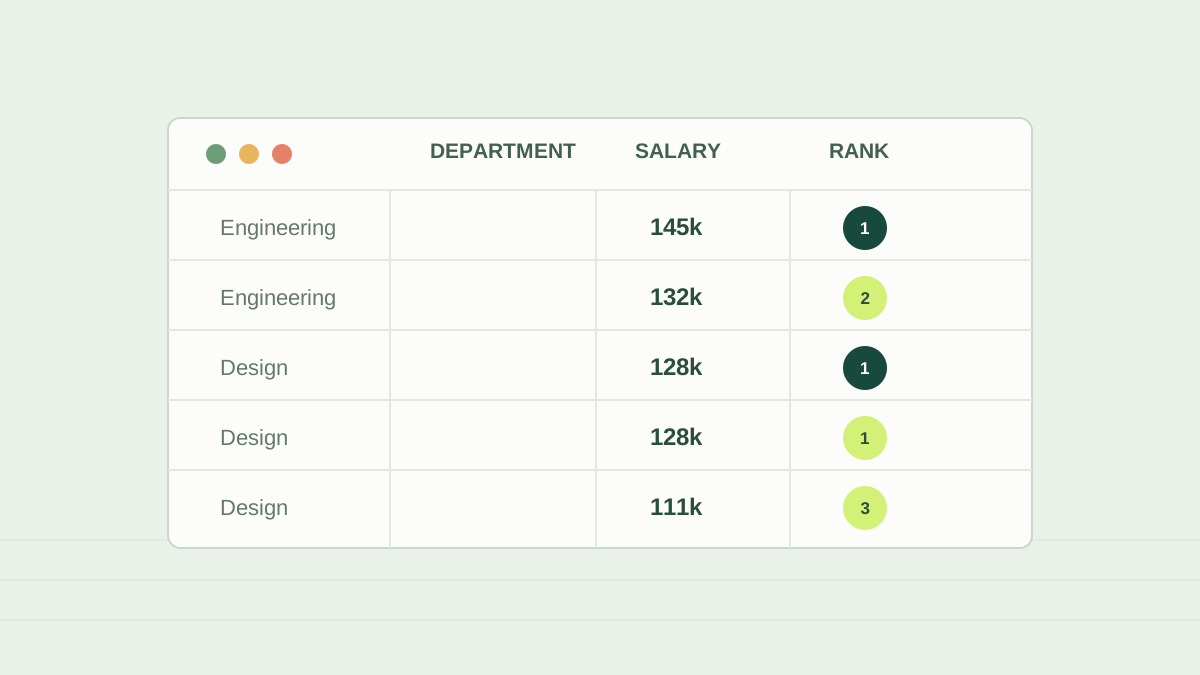
Window functions calculate a value across a set of related rows without collapsing the result to one row per group. They are useful when a report needs both each record and context such as its department rank, running total, or previous value.
A window has a partition and an order
PARTITION BY divides rows into independent groups. ORDER BY defines the sequence used inside each group. Neither clause guarantees the final display order of the query; add an outer ORDER BY when the result itself must be sorted.
SELECT
  employee_id,
  department,
  salary,
  RANK() OVER (
    PARTITION BY department
    ORDER BY salary DESC
  ) AS salary_rank
FROM employees;
ROW_NUMBER, RANK, and DENSE_RANK
- ROW_NUMBER assigns a unique sequence to every row. If sort values tie, add a stable tie-breaker when a repeatable order matters.
- RANK assigns equal values the same rank and leaves a gap after a tie. Scores 100, 90, 90, 80 receive ranks 1, 2, 2, 4.
- DENSE_RANK also gives ties the same rank, but does not leave a gap. The same scores receive 1, 2, 2, 3.
Top salary per department
To return every employee tied for the highest salary, use RANK and filter for rank 1 in an outer query. Use ROW_NUMBER instead when the business rule requires exactly one row and defines how ties are resolved.
WITH ranked AS (
  SELECT employee_id, department, salary,
         RANK() OVER (
           PARTITION BY department
           ORDER BY salary DESC
         ) AS salary_rank
  FROM employees
)
SELECT employee_id, department, salary
FROM ranked
WHERE salary_rank = 1;Common mistakes and interview prompts
- Confusing window ORDER BY with the final query ORDER BY.
- Using GROUP BY when each employee row must remain visible.
- Expecting ROW_NUMBER to be repeatable when its ordering columns are not unique.
- Be ready to explain how a window differs from GROUP BY and how you would select the latest record per customer.
Share this article
Continue your learning journeyExplore Interview Support